Use the arrow keys to move between letters. Press Enter or Space on the first letter of a word, then again on the last letter. Press Escape to cancel.
A few of the words
- MOTOROLA
- Motorola's MicroTAC and StarTAC models were among the most iconic handsets of the 1990s, setting the template for the flip-phone era that followed.Find this word in the grid to read its note.
- NOKIA
- Nokia's 3310, released in 2000, became a symbol of an era, but the Finnish company had already conquered the decade with sturdy candybar phones throughout the late nineties.Find this word in the grid to read its note.
- ROAMING
- Roaming charges in the nineties could turn a weekend road trip into a shocking phone bill, carriers billed by the minute the moment you left your home coverage area.Find this word in the grid to read its note.
- PAYPHONE
- At their peak in the mid-1990s, there were roughly 2.6 million payphones across the United States, a number that has dwindled dramatically in the decades since.Find this word in the grid to read its note.
armchairpuzzles.com · free large-print word searches
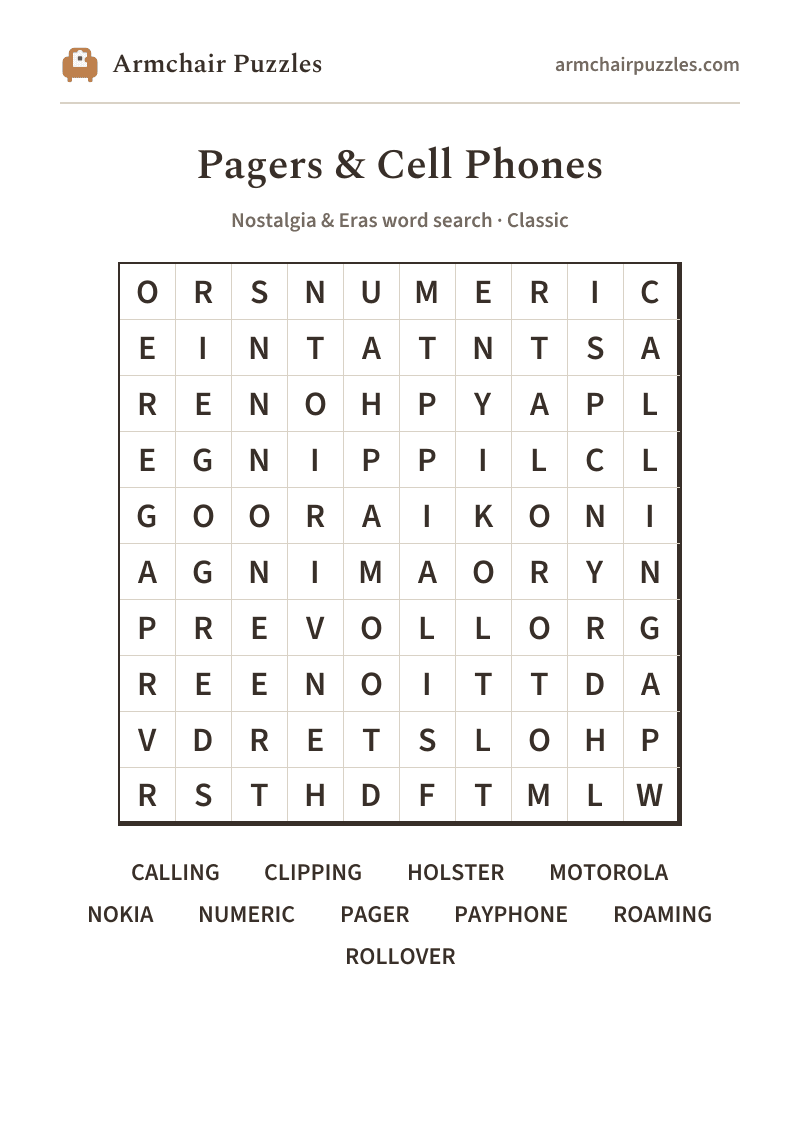
pagers and cell phones word search
Pagers & Cell Phones: a free online word search
Pagers and cell phones word search, back when MOTOROLA meant something clipped to your belt. Prints clean, no fuss, ready for a pen.
About Pagers & Cell Phones
Before a phone slipped into every pocket, staying connected took real effort. A numeric page meant sprinting to the nearest payphone, feeding in quarters, and hoping the line wasn't busy. The cell phones of the nineties were marvels of engineering and bulk, chunky Motorolas and candybar Nokias with stubby antennas that you raised like a tiny flag just to find a signal.
How to play
- 1Find a word.Tap its first letter, then tap along to its last. The trail fills in and finishes itself when it spells a word. Or press the first letter and drag.
- 2Words run in straight lines.Across and down, and on the harder difficulties diagonally and backwards.
- 3It marks itself.Each word you find takes on its own soft color on the grid and is crossed off the list.
- 4Choose a difficulty.Relaxed, Classic or Challenging set those directions and how much the word list helps, never the grid size. Tap the A buttons at the top to enlarge the letters, or pinch the grid.
Prefer pen and paper?
A clean, large-print sheet. Free, and no sign-up.